Every weak point in your CMS, indexed and watched.
vScan inventories every plugin, theme, core file and server component on your WordPress, Joomla or Drupal - then watches each one against the CVE databank.
From plugin to PHP, nothing left out.
Every component running on your CMS gets fingerprinted - plugins, themes, WordPress core, PHP runtime, the web server itself. Each one indexed with its version, source, and exact CVE exposure.
- Type-aware inventory Plugin · Theme · Core · Server · Runtime
- Filter chips, not dropdowns Vulnerable · Safe · By type · Search by CVE
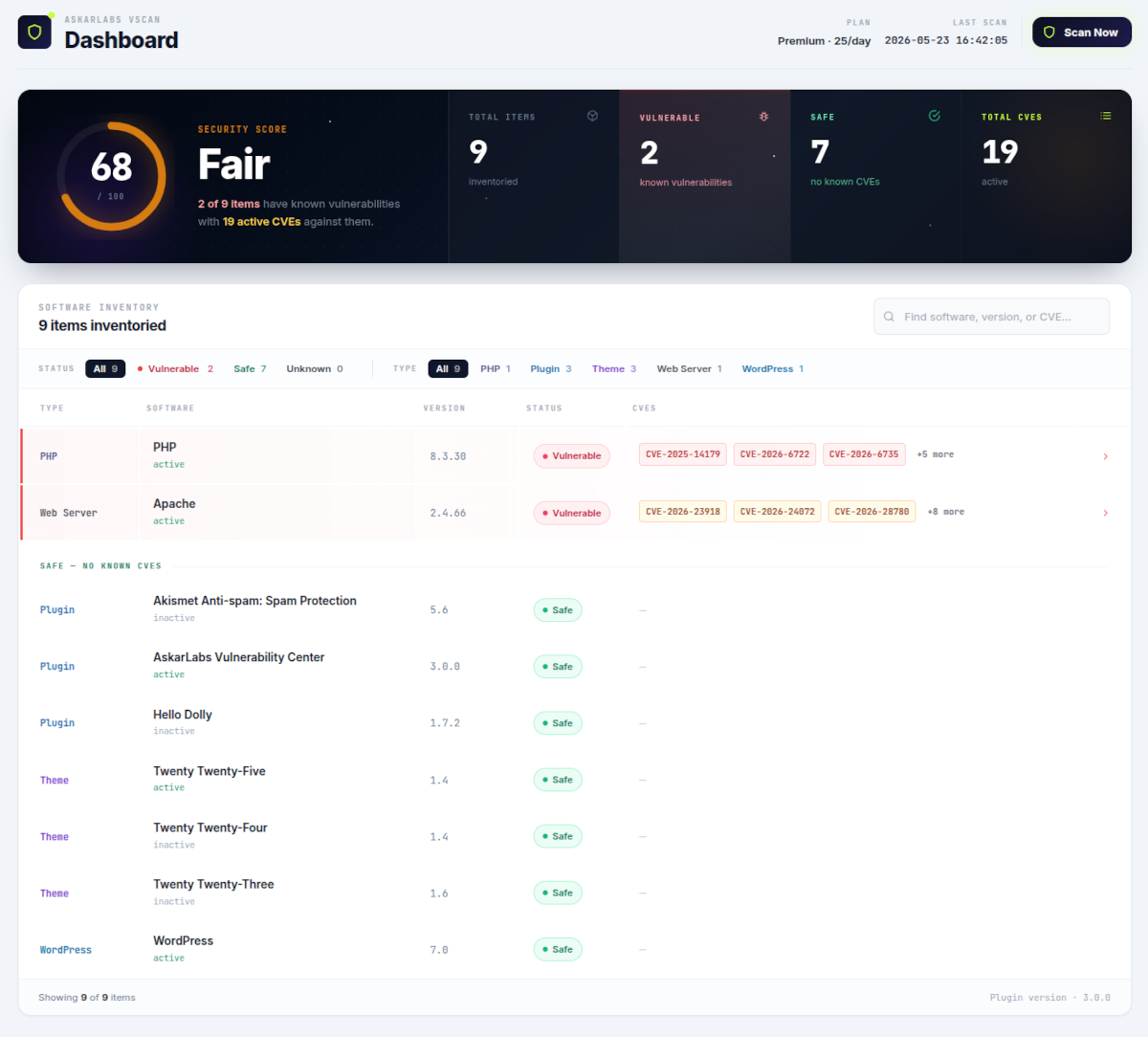
Every new CVE, matched against your stack. Hourly on Premium, daily on Free.
vScan subscribes to public CVE feeds and our own threat intel. When a vulnerability drops for something running on your site, it's matched on your next scheduled scan - every hour for Premium users, every 24 hours on Free.
- Hourly scanning · Premium Your site re-fingerprinted every 60 minutes
- Daily scanning · Free Full inventory re-scan once every 24 hours
- Severity prioritization Real exploitability ranks first, not just CVSS
- Impact-scored alerts Only flagged if the vulnerable component is active on your site
The whole toolkit
Built for the job, not the demo.
The capabilities that run in the background so your team can keep shipping product.
Scheduled scanning
Every component re-checked on your next scan cycle - no manual trigger needed. Premium runs every hour, Free runs every 24 hours.
Full-stack inventory
Plugins, themes, CMS core, PHP runtime, web server - every layer fingerprinted with its exact version.
Severity prioritization
Findings ranked by real exploitability - what an attacker would reach for first, not just the highest CVSS.
Smart filtering & search
Filter chips for status and type, with live counts. Search across software, version, or CVE ID.
Alerts routing Coming soon
Slack, email and webhooks fire when a component crosses into risky territory.
CSV export Coming soon
Pull the whole inventory or just the vulnerable rows. For audits, compliance, or piping into your own tools.
Multi-CMS coverage
Three CMSes, one console.
Whatever flavour of CMS your team ships on, vScan speaks it. Same dashboard, same inventory model, same CVE feed - just pointed at a different stack.
Privacy & control
Quiet by default. Yours, by design.
No agents on your boxes. No write access. No data we don't need. vScan is built to be the thing security teams approve on the first read.
Bound to one domain.
Every API key locks to a single domain on first save. If someone exfiltrates it, it can't be used anywhere else.
Installed in your CMS. Not on your server.
vScan runs as a lightweight plugin inside your WordPress, Joomla or Drupal. No SSH credentials, no server daemon, no kernel access - just a plugin that reads your installed components and reports back.
We look. We don't touch.
vScan never writes to your database, never edits a file, never auto-runs an update. The plugin reads what's installed and reports back - your hand stays on every fix.